

Why Choose Us
Professional Team
Professional R&D and production experience of connectors,Has already acquired ISO9001, ISO14001 international quality,environment and management system certificates.
Competitive Price
Our competitive pricing ensures that our customers get the best value for their money.trying to reduce costs and profits,and provide you with a good price.
Quality Control
For each process,we have strict inspection standards,and we always insist that quality is life.
Online Response
We will wait for your message within 24 hours. Thank you for your interest in our products.
What is SATA Connector
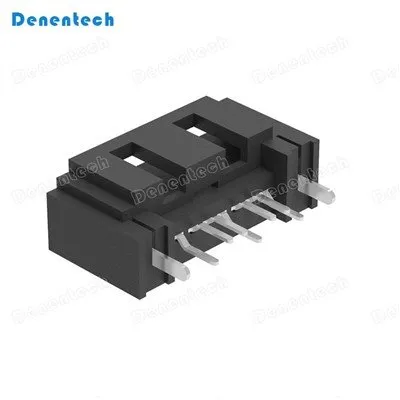
SATA (Serial Advanced Technology Attachment) connector is a type of data cable used to connect hard drives, solid-state drives (SSDs), and optical drives to a computer's motherboard. It is the standard interface for most modern storage devices and supports high-speed data transfer rates. SATA connectors come in different sizes and shapes, including the 7-pin and 15-pin versions, which can transmit power in addition to data signals. SATA has largely replaced the older IDE (Integrated Drive Electronics) and SCSI (Small Computer System Interface) connectors for internal storage devices.


Product Categories


Igh data transfer speeds
SATA cables are capable of transferring data at speeds of up to 6 Gbps (gigabits per second) for SATA 3 cables. This makes them much faster than older technologies, such as IDE and Parallel ATA.
Ease and simple to use
SATA cables are easy to install and connect. They have a small, 7-pin design and are very thin, making them easy to route and connect to hard drives and computer motherboards. They are also plug-and-play which means the user doesn't require to install any software to use them. The drivers are installed together with the operating system
Widely available
SATA cables are widely available and can be purchased from most computer hardware stores or online. They are also very affordable, making them a cost-effective choice for connecting storage devices.
Compatibility
SATA cables are compatible with a wide range of devices, including hard drives, solid-state drives, Blu-ray drives, and DVD drives. They are also backward compatible from one generation of devices to another.
SATA cables a power splitter
This allows the cable to draw power from both the device and the motherboard. This allows the device to draw additional power if needed and helps to prevent power issues that can occur with some devices.
Hot-swappable
SATA cables are hot-swappable, which means that you can connect and disconnect them while the computer is turned on. This is useful if you need to replace a failed hard drive or add a new one without shutting down the computer. This is good for servers if you have implemented RAID storage.
What are the Applications of SATA Connector
RAID controllers
SATA connectors are used to connect hard drives to RAID controllers, which are used to improve performance, increase storage capacity, and provide data redundancy in storage systems.
Network storage devices
SATA connectors are used in network-attached storage (NAS) devices to connect hard drives or solid-state drives to the device. This allows for centralized storage and access to data over a network.
Media servers
SATA connectors are used in media servers to connect hard drives or solid-state drives, allowing for centralized storage and streaming of media content such as music, videos, and photos.1. Hard Drives-SATA connectors are primarily used for connecting hard drives to a computer motherboard or other system. SATA connectors provide faster data transfer rates than previous IDE connectors, making them the preferred choice for modern storage devices.
Optical Drives
SATA connectors are also used for optical drives, such as DVD or Blu-Ray drives. SATA connectors provide more efficiency than previously-used connectors, making it faster and easier to transfer data from the disk to the computer.
Solid-State Drives
SATA connectors are also used for Solid-State Drives (SSDs), which are becoming popular due to their high speed, reliability, and durability. SATA connectors enable these drives to operate at fast speeds, making them an ideal solution for high-performance applications.
Types of SATA Connector

01
IDE/PATA
SATA connectors have largely replaced IDE/PATA connectors due to their superior performance, smaller form factor, and increased compatibility with modern storage devices. IDE/PATA connectors were prevalent in older computer systems but have become less common in recent years.

02
NVMe
Non-Volatile Memory Express (NVMe) is an interface protocol specifically designed for solid-state drives (SSDs). NVMe provides even faster data transfer speeds compared to SATA connectors, making it ideal for high-performance storage solutions. However,
NVMe drives typically come at a higher cost compared to SATA drives.

03
USB
Universal Serial Bus (USB) interfaces are primarily used for external storage devices, such as USB flash drives and external hard drives. While USB offers convenience and compatibility with a wide range of devices, it generally provides slower data transfer speeds compared to SATA connectors.

04
Thunderbolt
Thunderbolt interfaces, developed by Intel in collaboration with Apple, offer high-speed data transfer capabilities and support for multiple devices daisy-chained together. Thunderbolt interfaces are commonly found in Mac computers and some high-end Windows systems.
The Importance of SATA Connectors on the Motherboard
●Connecting Storage Devices
The SATA connector is the gateway for connecting storage devices to the motherboard. Whether installing a new hard drive, solid-state drive, or optical drive, identifying the SATA connector is essential for proper hardware integration and functionality.
●Upgrading Storage Capacity
When expanding the storage capacity of a computer system, locating the SATA connector is vital for seamlessly integrating additional storage devices. This is particularly important when adding new drives for increased data storage and improved system performance.
●Improving Data Transfer Speed
The SATA connector directly influences the data transfer speed between the storage devices and the motherboard. By identifying and utilizing the correct SATA connector, users can ensure optimal data transfer rates, enhancing overall system performance.
●Troubleshooting Connectivity Issues
In the event of connectivity problems with storage devices, locating the SATA connector facilitates effective troubleshooting. It allows users to inspect the physical connection, check for potential issues, and resolve any connectivity-related issues efficiently.
●Enhancing System Flexibility
Understanding the location of the SATA connector provides users with the flexibility to customize and expand their computer systems. This knowledge empowers users to make informed decisions regarding hardware upgrades and modifications, contributing to a more versatile and powerful computing experience.
Tips for Identifying the SATA Connector on a Motherboard
Refer to the Motherboard Manual
The motherboard manual provides detailed information about the layout and components of the motherboard, including the exact locations of the SATA connectors. Refer to the manual for specific guidance on identifying the SATA ports and connectors.
Observe the Labeled Ports
SATA ports on the motherboard are often labeled as “SATA,” “SATA1,” “SATA2,” and so on, indicating the number of available ports. This labeling simplifies the identification process and helps users locate the SATA connectors with ease.
Inspect the Edge of the Motherboard
SATA ports are typically positioned along the edge of the motherboard, making them easily accessible for connecting storage devices. Focus on this area when identifying the SATA connectors, as they are commonly located in close proximity to each other.
Look for L-Shaped Connectors
L-shaped connectors near the SATA ports signify the presence of SATA connectors. These connectors are designed to prevent incorrect insertion of SATA cables, ensuring a secure and proper connection between the motherboard and the storage devices.
Count the Pins
Take note of the 7-pin data connectors and the 15-pin power connectors associated with the SATA ports. This helps in confirming the presence of SATA connectors and distinguishing them from other ports on the motherboard.
Utilize Visual Aids
In cases where the interior of the computer case is dimly lit, use a flashlight to illuminate the motherboard and identify the SATA connectors more effectively. This enhances visibility and facilitates accurate identification of the connectors.
Steps for the SATA connector on the motherboard
Identify the Motherboard
Power off the computer and open the computer case to access the internal components. Locate the motherboard, which is the main circuit board within the computer housing all essential components, including the SATA connectors.
Locate the SATA Ports
Inspect the motherboard to find the SATA ports. These ports are typically rectangular and are often positioned along the edge of the motherboard. They may be labeled as “SATA,” “SATA1,” “SATA2,” and so on, indicating the number of available ports.
Recognize the L-Shaped Connectors
Identify the L-shaped connectors near the SATA ports. These connectors are designed to prevent incorrect insertion of SATA cables, ensuring a secure and proper connection between the motherboard and the storage devices.
Count the Pins
Take note of the 7-pin data connectors and the 15-pin power connectors associated with the SATA ports. These connectors facilitate data transfer and provide power to the connected storage devices, playing a crucial role in the functionality of the SATA interface.
Refer to the Motherboard Manual
If you encounter difficulty locating the SATA connectors, consult the motherboard manual for detailed information. The manual provides a comprehensive layout of the motherboard, including the exact locations of the SATA connectors and their corresponding specifications.
Use a Flashlight if Necessary
In cases where the interior of the computer case is dimly lit, use a flashlight to illuminate the motherboard and identify the SATA connectors more effectively. This ensures clear visibility and accurate identification of the connectors.
Maintenance Tips for SATA Connector
Ensure that the SATA power cable is securely connected to the power supply unit (PSU). Make sure it's firmly attached and not loose.
Use a multimeter to check the voltages of the SATA power cable. Ensure that the voltage readings are within the acceptable range specified by the manufacturer.
If possible, connect the device to a different power supply to see if the issue persists. This can help determine if the problem lies with the power supply itself.
Ensure that the SATA power cable is properly connected to the motherboard or device interfaces. Check for any visible damage or looseness.
Over time, dust and debris can accumulate on the connectors, leading to poor contact.Gently clean the SATA power cable connectors and the motherboard/device interfaces to establish a reliable connection.
Our Factory
Denentech Electronic Technology Co, ltd, established in 2003, Professional R&D and production experience of connectors. Has more than 3000 square meters. Specializes in manufacturer percision board to board.Wire to board connectors and cable, assemblies for connectors, for computer&perpheral devices.


Certificate

FAQ
Q: Are SATA cables necessary?
Q: Do you need a SATA cable for SSD?
Q: Which SATA cable generation is used nowadays?
Q: How to connect multiple SATA power connectors to a system?
Q: How to add additional SATA ports to your system?
Q: Can You Connect Two Sata Cables Together?
Q: What is SATA and SAS?
Q: How Many Connectors Does a Sata Cable Have?
Q: Can You Plug Multiple Things into a Sata Power Cable?
Q: What is the Purpose of Having Multiple Connectors on Sata Cables ?
Q: What is a SATA connector?
Q: What are the benefits of a SATA connector?
Q: How Do I Choose the Best Cable for My Drive And Motherboard Setup ?
Q: What is the difference between a SATA I, II, and III connector?
Q: Are SATA connectors backwards compatible?
Q: Can SATA connectors be hot-swapped?
Q: What types of devices can be connected using a SATA connector?
Q: What is an eSATA connector?
Q: The Difference Between SATA and SAS?
Q: How Do I Purchase SATA and SAS?
We're professional sata connector manufacturers and suppliers in China, specialized in providing high quality customized products. We warmly welcome you to wholesale high quality sata connector at competitive price from our factory. Contact us for more details.
Dual Row Straight Male, High Speed Wire To Board Connector, 2 20P 2Row 2 54 mm Pin Headers